
Camera setup · Annke
Connect an Annke camera to VISEC.
Annke IP cameras connect to VISEC over ONVIF. Newer models ship with it on; older firmware needs one box ticked in the web interface.
Download VISEC free
One camera free for life · Windows 10 & 11 · no card, no email.
First, try the easy way
Press scan.
VISEC searches your network for ONVIF cameras and lists what it finds. If your Annke camera already has ONVIF switched on, it appears here and you are watching live in a few seconds — nothing below is needed.
Turning ONVIF on
If the camera does not appear.
Menu names move around between firmware versions, so treat these as the place to look rather than an exact path.
-
Open the camera in a browser
Enter the camera's IP address and sign in. Annke's SADP tool or VISEC's scan will show the address if you do not know it.
-
Enable ONVIF
Go to Configuration › Network › Advanced Settings › Integration Protocol and tick Enable ONVIF. On newer models it is already on.
-
Add an ONVIF user if asked
If the page offers one, add an ONVIF user on the same screen. On many models the ONVIF user is admin with the camera's activation password.
-
Scan from VISEC
Press scan, pick the camera and enter those credentials.
PortsKeep HTTP on 80 and RTSP on 554.
NVR kitsCameras plugged into an Annke NVR's own PoE ports sit on a private network behind the recorder. Connect the camera to your router or switch for VISEC to see it.
Still not found?Check the camera and PC share a subnet.
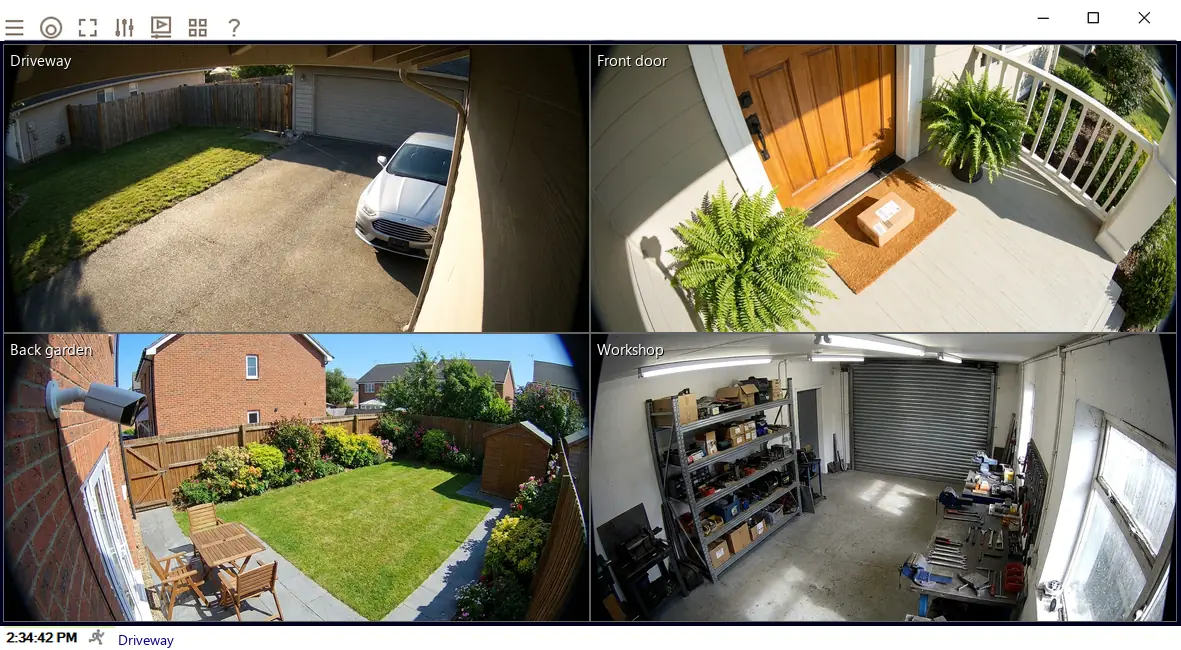
Once it is connected.
- Watch it liveOn its own or beside your other cameras, across up to 8 monitors.
- Record on motionChoose the part of the picture that matters and how sensitive it should be.
- Get an emailA snapshot the moment motion starts, so you know without watching.
- Read number platesPlate recognition is included in every license, including the free one camera license.
Try it on your Annke camera tonight.
The complete software, free for life on one camera. No card, no email, no trial clock.